DevOps平臺GitLab發布了主要版本更新GitLab 15.0,該開發團隊在該平臺持續加入更多的DevOps功能,強化了可觀察性和持續安全性功能,協助用戶程式碼開發和協作,並且安全地交付軟體。
佈署gitlab-postgresql
# Service
kind: Service
apiVersion: v1
metadata:
  name: gitlab-postgresql
  labels:
    name: gitlab-postgresql
spec:
  ports:
    - name: postgres
      protocol: TCP
      port: 5432
      targetPort: postgres
  selector:
    name: postgresql
  type: ClusterIP
---
# PVC
apiVersion: v1
kind: PersistentVolumeClaim
metadata:
  name: gitlab-postgresql-pv-claim
  labels:
    app: gitlab-postgresql
spec:
  storageClassName: standard
  accessModes:
    - ReadWriteOnce
  resources:
    requests:
      storage: 50Gi
---
# Deployment
kind: Deployment
apiVersion: apps/v1
metadata:
  name: gitlab-postgresql
  labels:
    name: gitlab-postgresql
spec:
  replicas: 1
  selector:
    matchLabels:
      name: postgresql
  template:
    metadata:
      name: postgresql
      labels:
        name: postgresql
    spec:
      containers:
      - name: gitlab-postgresql
        image: sameersbn/postgresql:12-20200524
        ports:
        - name: postgres
          containerPort: 5432
        env:
        - name: DB_USER
          value: gitlab
        - name: DB_PASS
          value: admin@1234
        - name: DB_NAME
          value: gitlab_production
        - name: DB_EXTENSION
          value: 'pg_trgm,btree_gist'
        livenessProbe:
          exec:
            command: ["pg_isready","-h","localhost","-U","postgres"]
          initialDelaySeconds: 30
          timeoutSeconds: 5
          periodSeconds: 10
          successThreshold: 1
          failureThreshold: 3
        readinessProbe:
          exec:
            command: ["pg_isready","-h","localhost","-U","postgres"]
          initialDelaySeconds: 5
          timeoutSeconds: 1
          periodSeconds: 10
          successThreshold: 1
          failureThreshold: 3
        volumeMounts:
        - name: gitlab-postgresql-persistent-storage
          mountPath: /var/lib/postgresql
      # 持久化存储配置
      volumes:
      - name: gitlab-postgresql-persistent-storage
        persistentVolumeClaim:
          claimName: gitlab-postgresql-pv-claim
佈署gitlab-redis
# Service
kind: Service
apiVersion: v1
metadata:
  name: gitlab-redis
  labels:
    name: gitlab-redis
spec:
  type: ClusterIP
  ports:
    - name: redis
      protocol: TCP
      port: 6379
      targetPort: redis
  selector:
    name: gitlab-redis
# PVC
---
apiVersion: v1
kind: PersistentVolumeClaim
metadata:
  name: gitlab-redis-pv-claim
  labels:
    app: gitlab
spec:
  storageClassName: standard
  accessModes:
    - ReadWriteOnce
  resources:
    requests:
      storage: 5Gi
---
# Deployment
kind: Deployment
apiVersion: apps/v1
metadata:
  name: gitlab-redis
  labels:
    name: gitlab-redis
spec:
  replicas: 1
  selector:
    matchLabels:
      name: gitlab-redis
  template:
    metadata:
      name: gitlab-redis
      labels:
        name: gitlab-redis
    spec:
      containers:
      - name: gitlab-redis
        image: 'redis:6.2'
        ports:
        - name: redis
          containerPort: 6379
          protocol: TCP
        volumeMounts:
          - name: gitlab-redis-persistent-storage
            mountPath: /var/lib/redis
        livenessProbe:
          exec:
            command:
              - redis-cli
              - ping
          initialDelaySeconds: 5
          timeoutSeconds: 5
          periodSeconds: 10
          successThreshold: 1
          failureThreshold: 3
        readinessProbe:
          exec:
            command:
              - redis-cli
              - ping
          initialDelaySeconds: 5
          timeoutSeconds: 5
          periodSeconds: 10
          successThreshold: 1
          failureThreshold: 3
      # 持久化存储配置
      volumes:
      - name: gitlab-redis-persistent-storage
        persistentVolumeClaim:
          claimName: gitlab-redis-pv-claim
佈署Gitlab
# Service
kind: Service
apiVersion: v1
metadata:
  name: gitlab
  labels:
    name: gitlab
spec:
  type: LoadBalancer
  ports:
    - name: http
      protocol: TCP
      port: 80
    - name: ssh
      protocol: TCP
      port: 22
      targetPort: ssh
  selector:
    name: gitlab
---
# PVC
apiVersion: v1
kind: PersistentVolumeClaim
metadata:
  name: gitlab-pv-claim
  labels:
    app: gitlab
spec:
  storageClassName: standard
  accessModes:
    - ReadWriteOnce
  resources:
    requests:
      storage: 50Gi
---
# Deployment
kind: Deployment
apiVersion: apps/v1
metadata:
  name: gitlab
  labels:
    name: gitlab
spec:
  replicas: 1
  selector:
    matchLabels:
      name: gitlab
  template:
    metadata:
      name: gitlab
      labels:
        name: gitlab
    spec:
      containers:
      - name: gitlab
        image: 'gitlab/gitlab-ee:latest'
        ports:
        - name: ssh
          containerPort: 22
        - name: http
          containerPort: 80
        - name: https
          containerPort: 443
        env:
        - name: TZ
          value: Asia/Shanghai
        - name: GITLAB_TIMEZONE
          value: Beijing
        - name: GITLAB_SECRETS_DB_KEY_BASE
          value: long-and-random-alpha-numeric-string
        - name: GITLAB_SECRETS_SECRET_KEY_BASE
          value: long-and-random-alpha-numeric-string
        - name: GITLAB_SECRETS_OTP_KEY_BASE
          value: long-and-random-alpha-numeric-string
        - name: GITLAB_ROOT_PASSWORD
          value: admin@1234
        - name: GITLAB_ROOT_EMAIL
          value: [email protected]
        - name: GITLAB_HOST
          value: 'gitlab.yourdomain.com'
        - name: GITLAB_PORT
          value: '80'
        - name: GITLAB_SSH_PORT
          value: '22'
        - name: GITLAB_NOTIFY_ON_BROKEN_BUILDS
          value: 'true'
        - name: GITLAB_NOTIFY_PUSHER
          value: 'false'
        - name: DB_TYPE
          value: postgres
        - name: DB_HOST
          value: gitlab-postgresql
        - name: DB_PORT
          value: '5432'
        - name: DB_USER
          value: gitlab
        - name: DB_PASS
          value: admin@1234
        - name: DB_NAME
          value: gitlab_production
        - name: REDIS_HOST
          value: gitlab-redis
        - name: REDIS_PORT
          value: '6379'
        livenessProbe:
          httpGet:
            path: /
            port: 80
            scheme: HTTP
          initialDelaySeconds: 300
          timeoutSeconds: 5
          periodSeconds: 10
          successThreshold: 1
          failureThreshold: 3
        readinessProbe:
          httpGet:
            path: /
            port: 80
            scheme: HTTP
          initialDelaySeconds: 5
          timeoutSeconds: 30
          periodSeconds: 10
          successThreshold: 1
          failureThreshold: 3
        volumeMounts:
        - name: gitlab-persistent-storage
          mountPath: /home/git/data
        - name: localtime
          mountPath: /etc/localtime
      volumes:
      - name: gitlab-persistent-storage
        persistentVolumeClaim:
          claimName: gitlab-pv-claim
      - name: localtime
        hostPath:
          path: /etc/localtime
檢查是否正常
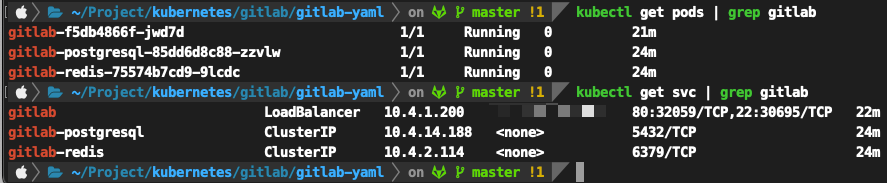
後台帳密 root / admin@1234
註冊Runner Menu -> Admin -> Runners
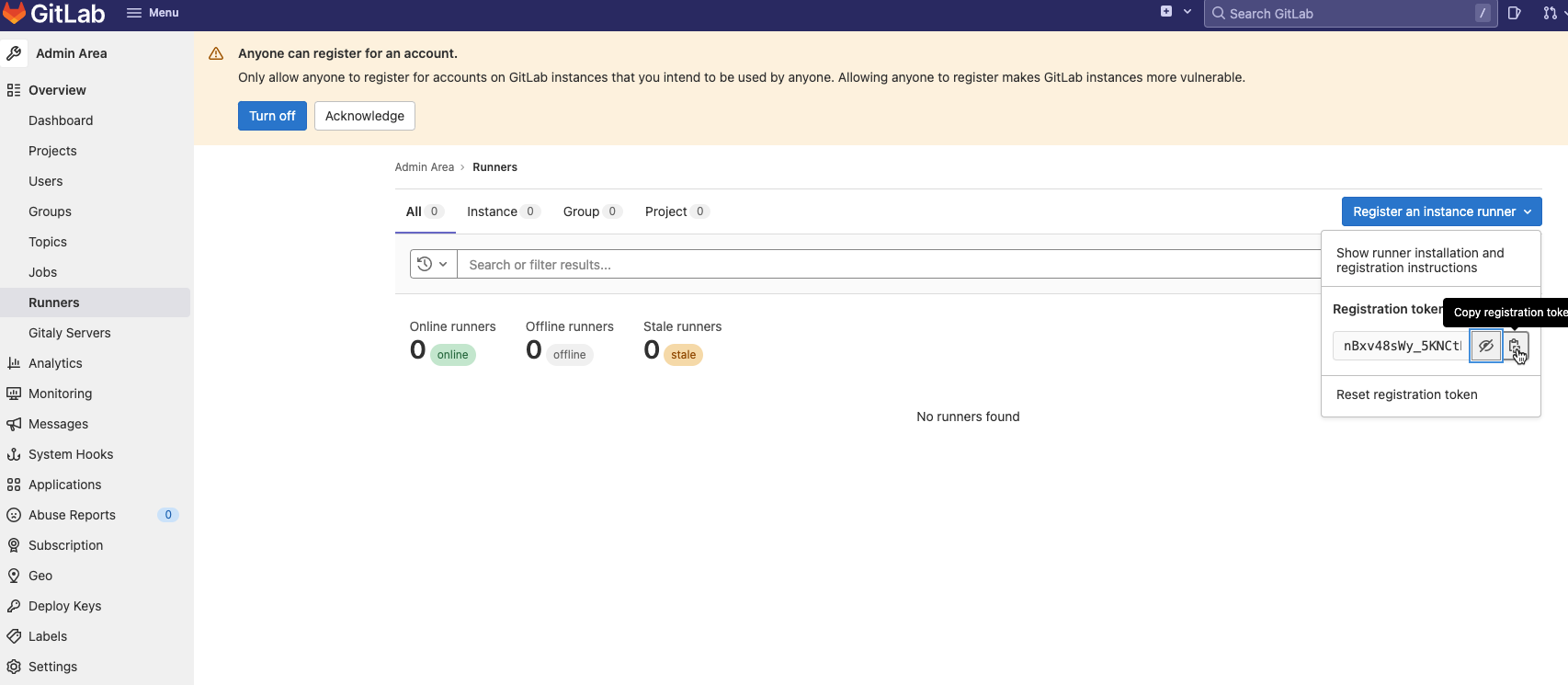
複製token
新增vaules.yaml 修改以下檔案的token、domain
imagePullPolicy: IfNotPresent
gitlabUrl: "http://gitlab.yourdomain.com"
runnerRegistrationToken: "YourToken"
concurrent: 10
checkInterval: 30
logLevel: info

rbac:
  create: true

metrics:
  enabled: false

runners:
  config: |
    [[runners]]
      [runners.kubernetes]
        namespace = "{{.Release.Namespace}}"
        image = "ubuntu:20.04"
        [[runners.kubernetes.volumes.host_path]]
            name = "docker"
            mount_path = "/var/run/docker.sock"
            host_path = "/var/run/docker.sock"
  privileged: "true"
  name: kubernetes-runner
  tags: "kubernetes,runner"

securityContext:
  runAsUser: 100
  # runAsGroup: 65533
  fsGroup: 65533
執行以下安裝
kubectl create ns ji-k8s-runner
helm repo add gitlab https://charts.gitlab.io
helm repo list
helm install --namespace ji-k8s-runner ji-gitlab-runner -f values.yaml gitlab/gitlab-runner
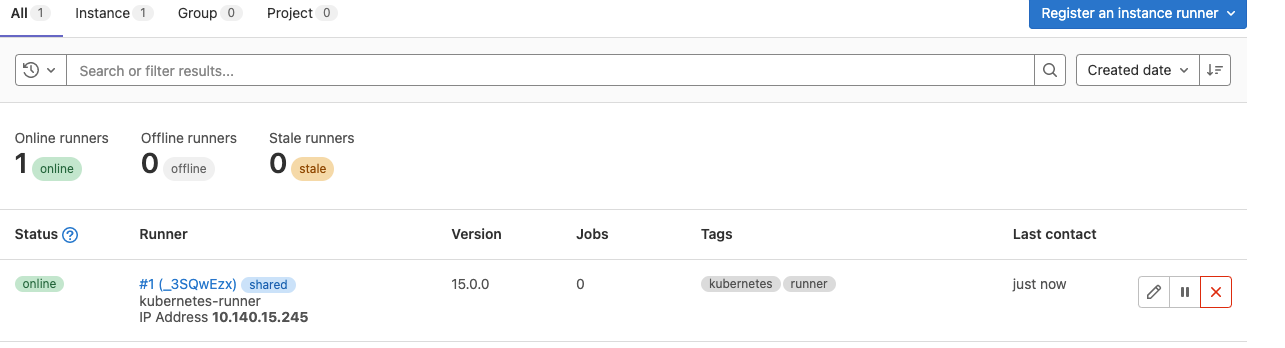
註冊成功會顯示如下